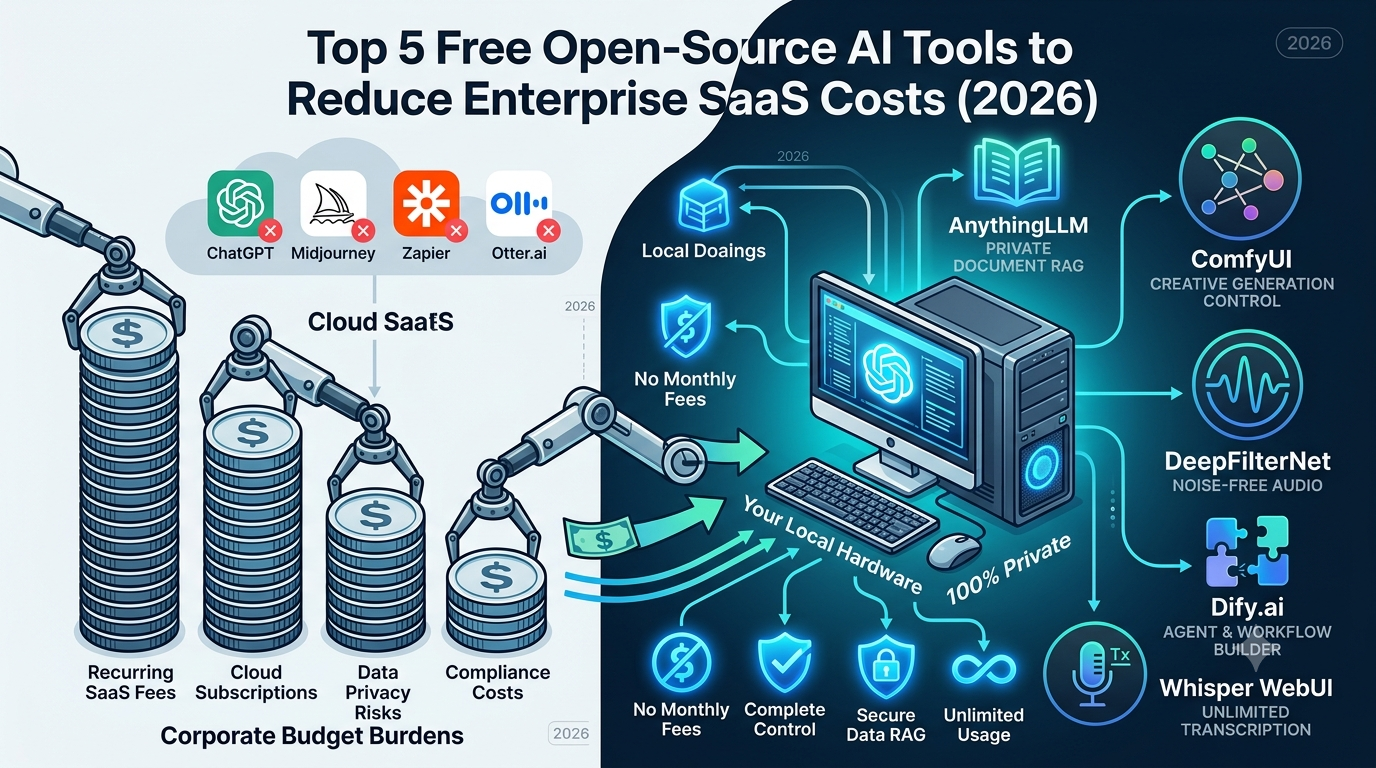
AI software has revolutionized business productivity, but recurring SaaS subscriptions are crippling corporate and freelance budgets. Paying $20 to $50 monthly for individual platforms quickly scales into thousands of dollars in annual software overhead.
Furthermore, sending sensitive company data to third-party cloud vendors creates severe data privacy and compliance risks.
Fortunately, self-hosted open-source AI tools offer powerful, enterprise-grade open-source AI solutions that eliminate monthly fees while keeping your data 100% private. Here are the top 5 open-source AI platforms to replace expensive SaaS subscriptions this year.
1. AnythingLLM (Replaces ChatGPT Plus & Claude Enterprise)
If your team pays for ChatGPT Plus or Claude Enterprise just to analyze internal PDFs and company documents, AnythingLLM is the most secure free alternative.
- Key Benefit: Full Retrieval-Augmented Generation (RAG) with total data privacy.
- Cost Savings: Eliminates per-seat monthly licenses by running entirely on your local workspace or private server via Ollama.
- Best For: Businesses handling sensitive client data, legal teams, and researchers.
Download & Setup Note: Ensure your system has at least 16GB of RAM to run 8B-parameter local models smoothly alongside AnythingLLM.
💡 Ready to get started? Check out our complete 10-minute guide on [How to Run a Local LLM Offline with Ollama] to set up your local AI environment for free.
2. ComfyUI (Replaces Midjourney & Runway Subscriptions)
Midjourney provides exceptional AI generation, but its tier-based credit system limits commercial usage. ComfyUI is a visual, node-based interface that gives you unrestricted access to Stable Diffusion and Flux models.
- Key Benefit: Complete node-level control over image parameters with zero generation limits.
- Cost Savings: Replaces recurring $30/month creative cloud plans by utilizing your own GPU power.
- Best For: Marketing agencies, game developers, and commercial UI/UX designers.
3. DeepFilterNet (Replaces Krisp & Premium Audio Cleaners)
Audio enhancement platforms for remote meetings charge heavy recurring subscription fees per user. DeepFilterNet leverages deep learning models written in Rust to filter out ambient background noise instantly.
- Key Benefit: Ultra-low latency background noise reduction powered by local hardware.
- Cost Savings: Zero subscription costs for remote teams, podcasters, and call centers.
- Best For: Remote workers, podcasters, and customer support managers.
Configuration Tip: While DeepFilterNet runs as a lightweight engine, pairing it with virtual audio routing (like PipeWire on Linux or VB-Audio Cable on Windows) allows one-click noise suppression during live Zoom/Teams calls.
4. Dify.ai (Replaces Zapier AI & Custom Chatbot Builders)
Building automated customer service agents or internal AI workflows with no-code tools like Zapier can quickly lead to massive monthly tier upgrades. Dify.ai is an open-source LLM application development platform.
- Key Benefit: Drag-and-drop visual workflow builder for complex AI agents and web scrapers.
- Cost Savings: Eliminates middleman API markup fees and high-tier SaaS workflow subscriptions.
- Best For: Enterprise automation teams, digital marketers, and startup founders.
5. Whisper WebUI (Replaces Otter.ai & Descript)
Cloud-based transcription platforms charge based on audio minutes processed, making large-scale audio analysis expensive. Whisper WebUI brings OpenAI’s robust Whisper models into a local, user-friendly browser interface.
- Key Benefit: Unlimited multi-language audio transcription and automated subtitle generation.
- Cost Savings: Cuts out per-minute transcribing fees completely.
- Best For: Journalists, video editors, and corporate meeting note-takers.
System Requirements for Running Local Open-Source AI
Before replacing your corporate SaaS stack, ensure your local hardware or private server meets these baseline requirements:
- OS: Windows 11, macOS (M-Series recommended), or Ubuntu 22.04 LTS
- RAM: 16GB minimum (32GB+ recommended for heavy multi-agent workflows)
- GPU: NVIDIA RTX 3060/4060 or higher with at least 8GB VRAM (for image generation & local LLMs)
- Storage: 50GB+ NVMe SSD space for hosting model weights locally
| Tool Name | SaaS Replaced | Estimated Annual Savings* | Primary Enterprise Use Case |
| AnythingLLM | ChatGPT Plus ($240/yr) | $240+ per user | Private Document RAG & Chat |
| ComfyUI | Midjourney ($360/yr) | $360+ per user | Commercial AI Image Generation |
| DeepFilterNet | Krisp ($144/yr) | $144+ per user | Real-Time Call Noise Suppression |
| Dify.ai | Zapier AI ($300+/yr) | $300+ per business | Custom Workflow & Agent Building |
| Whisper WebUI | Otter.ai ($200/yr) | $200+ per user | Unlimited Local Video/Audio Transcription |
*Estimated savings calculated based on standard individual/pro monthly subscription tiers.
Final Verdict: How Much Can You Actually Save?
Switching from proprietary subscription platforms to self-hosted, open-source AI alternatives can save an individual over $1,200 annually—and thousands more for small teams. While setup requires a brief initial configuration, the long-term benefits in cost reduction, operational control, and corporate data security make adopting open-source AI software an essential cost-reduction strategy for 2026.
Which SaaS platform are you planning to replace first? Leave your thoughts and system setups in the comments below!